
/* A simple demonstration of conditional statements using the 'odd-or-even' scenario in C#.
 * Concepts covered:
 * 1. Variables and their respective data types
 * 2. Methods (non-void and return statements)
 * 3. Expressions and assignment statements
 * 4. Input and output
 * 5. Exception handling (mentioned)
 * 6. Inline documentation (comments)
 * 7. Conditional statements (if-statements, ternary operators and switch statements)
 * 8. Operators (modulus)
 * 9. Input validation (using the tryParse method) */

//Library equipped with all the required features, do not omit!
using System;

namespace OddOrEven
{
    class Program
    {
        /* This function will simply return a value of 0 or 1,
         * this is done by retrieving the input and calculating the rest of the division. */
        static int modulus_check(int value)
        {
            //Modulus returns the remainder.
            return value % 2;
            //Any line of code beyond the return statement is ignored.
        }
        static void Main(string[] args)
        {
            /* variable value of type integer,
             * this will be used to convert the input (initially string) to integer
             * when using the tryParse method as this accepts two parameters.
             * You would first need to pass the string variable,
             * followed by out [REPLACE WITH INTEGER VARIABLE]. */
            int value;

            /* Prompt user to enter the number.
             * Make sure you do not enter a decimal number.
             * (may yield undesirable results if not handled correctly,
             * hence why tryParse will be used.) */
            Console.Write("Enter an integer: ");

            //The input will first be treated as string.
            string input = Console.ReadLine();

            /* What will happen at this point:
             * 1. String input is converted to integer.
             * 2. It will then check that the input matches the correct format.
             * (i.e: it will raise an 'exception' if it detects textual/decimal input)
             *
             * This is an alternative to the try-catch method, and is said to be slightly quicker.
             * In this case, the try-catch would have looked something similar to this...
             *
             * try
             * {
             *      ...
             * }
             * catch(FormatException [ANYTHING OF YOUR CHOICE, NO KEYWORDS])
             * {
             *      Console.WriteLine([exception_name].Message);
             *      //Use the variable by itself for a more detailed error message.
             * }
             */
            if(int.TryParse(input, out value))
            {
                /* Invoke the user-defined function.
                 * Make sure that you add the Console.Write()
                 * otherwise the result will not be displayed. */
                Console.Write(modulus_check(value));

                /* We can check whether or not the value is odd or even in three ways:
                 * 1) if-statement
                 * 2) switch statement
                 * 3) ternary operators */

                //Example 1: Switch statement

                //Do not include the '== 0'.
                switch(value % 2)
                {
                    //The case are the conditions.

                    //In case the value is 0.
                    case 0:
                        Console.WriteLine(": This is an even number.");
                        break;
                    //In case the value is 1.
                    case 1:
                        Console.WriteLine(": This is an odd number.");
                        break;
                    //Display an error message if a different value is produced.
                    default:
                        Console.WriteLine(": Value can only be 0 (even) or 1 (odd).");
                        break;
                }

                //Leave a blank line.
                Console.WriteLine();

                //Example 2: if-statement

                //If the modulo calculation returns 0...
                if(value % 2 == 0) { Console.WriteLine(": This is an even number."); }
                //If the modulo calculation returns 1...
                else { Console.WriteLine(": This is an odd number."); }

                //Leave a blank line.
                Console.WriteLine();

                //Example 3 (last but not least): ternary operator

                //var accepts all sorts of data, use this if you are not sure of what data type to use.

                /* The expression is stored in the variable 'result' of type var.
                 * If modulo calculator evaluates to 0, print first statement.
                 * Else print the second statement. */
                var result = (value % 2 == 0) ? ": This is an even number." : ": This is an odd number.";
                Console.WriteLine(result);

                /* Value can only be 0 or 1.
                 * 0 = even/1 = odd
                 * Value is returned to main method from modulus_check. */
            }
            else
            {
                //String/decimal input is not allowed!
                Console.WriteLine("Textual input not allowed!");
            }

            //Used so the console does not close after debugging, press Enter to exit.
            Console.ReadLine();
        }
    }
}
Our fellow beginners may find the above code intimidating but fear not, this solution will be broken down bit by bit. I added inline-documentation (comments) so you can skim through the code easily and fathom the solution’s purpose.
Comments in C# can be added in two ways: // for a single-line comment and /* [ENTER COMMENT HERE] */ for multi-line comments. Moreover, you can also comment out code you may not need to execute for the time-being by pressing CTRL-K-C (and CTRL-K-U to un-comment), this is less time-consuming as there is no need to re-type the eliminate code should you ever need to refer to it.

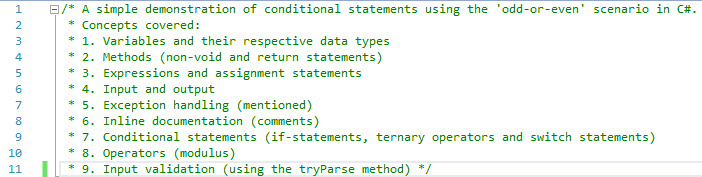
Comments help break down a program as they annotate the purpose and functions of the code, these are not only helpful for the programmer but also for others who wish to review the solution. To put it simply, comments are not mandatory but are definitely recommended. There is no need to go overboard with them, of course.
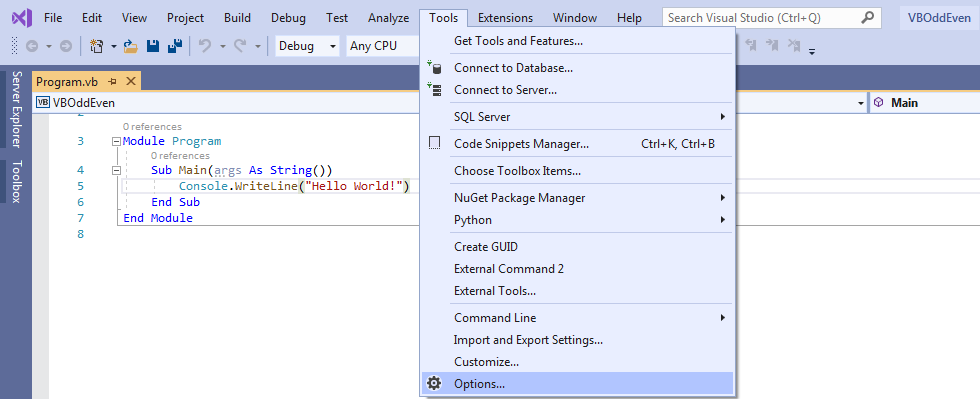
Inline documentation in Visual Studio is usually highlighted in green. If you are not afraid of tinkering with the IDE (Integrated Development Environment; Integrated Development Environment is to Integrated Drive Electronics as Java is to JavaScript, I digress. The Integrated Development Environment is a software application, allowing programmers to develop their own software, equipped with build automation tools, compilers and/or interpreters, debugger and source code editing functionalities), you can actually customize the source code editor.


View full list here: https://docs.microsoft.com/en-us/dotnet/api/system?view=netframework-4.8
In this scenario, there are two methods (the modulus_check and the Main). The Main is the method which is first executed, and where other methods can be invoked (called). The modulus_check method simply calculates returns the remainder using the modulo 2 based on the input which is subsequently passed as a parameter to the modulus_check method from the Main method as shown below.
In Line 35, we simply declare an integer variable. Since this variable will store a value input by the user, we needn’t initialize said variable. The difference between declaring and initializing a variable is that declaration is when one specifies a data type (this post assumes you may be familiar with data types, if not more will be discussed about data types later on) and an identifier (name, label, you name it…) for a variable, whereas initialization is when you also assign a value to a variable (assignment statement).

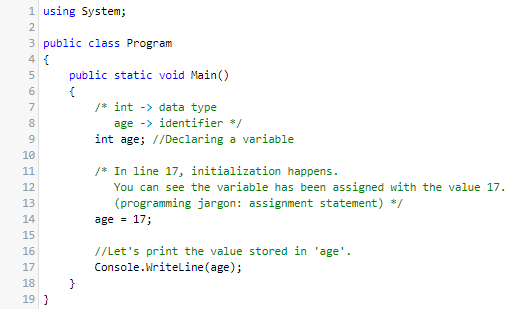
Below you will see how you can declare and initialize a variable in a single line, also known as direct initialization.

An identifier refers to the name you give to a variable. You can name your variable anything you please as long as you comply with the naming conventions.
- Variables must never start with a number or special characters.
- Keywords (the programming language syntax) must never be used as an identifier unless they are prefixed with a @.
- Spaces are not allowed, instead use the underscore to delimit words.
View the full list of keywords here: https://docs.microsoft.com/en-us/dotnet/csharp/language-reference/keywords/
Links to learning more about coding standards and naming conventions:
https://www.c-sharpcorner.com/UploadFile/8a67c0/C-Sharp-coding-standards-and-naming-conventions/
Anyways, back to the focal point…

Line 41 consists of a print statement, here the user will be asked to enter a whole number. Note that I used the Write instead of WriteLine. Write allows subsequent outputs to be displayed in a single line, whereas WriteLine allows subsequent outputs to be displayed in a new line.


Here we are saying that if the input matches the correct format, we carry on with the modulus calculation and display the necessary result. Else, raise an error and display an error message to the user.

Alternatively, we could have used the try-catch blocks. try encapsulates code which may be erroneous, whilst the catch encapsulates code which handles these errors rather than letting the application crash, hence exception handling. Although not mentioned, the finally encapsulates code which runs irregardless of the outcome.
Decision making (conditional statements in programming terms) has never been easier in C#. We will be attempting the following:
- switch statements
- if-else statements (we have already used this for input validation)
- ternary operators
Switch statement

if-else statement


Will it work?
That we shall see very shortly…

How to be calm when the unthinkable arrives…

And for the record, it would always be best to select No.
Good luck locating and rectifying the errors! P.S: Summon the trusty Error List…. and stay calm.
No issues found!

Let’s see what happens if I enter… let’s say, 24.

What if I enter 5?

And a special character for good measure…

Input Process Output (IPO) Diagram

Conclusion
We have confirmed that the program is error-free (does not crash and produces the correct results).
Feel free to refer to the code, I will also be attaching a link to download the source code. Please extract before use.
In the case of insufficient storage space, you can use .NET Fiddle. It supports C#, F# and Visual Basic, and only requires an internet connection.
Thank you for taking some time out of your day to read this post! Stay tuned for more updates! I may be creating the Visual Basic version using Windows Forms/WPF.
 adoseof802